
How to get your business on Google Maps
When someone nearby searches “klinik near me”, “aircond service Shah Alam” or “kedai kek Rawang”, Google shows a map with a few businesses before any website. Getting into that map is free. Here is how to set it up properly, step by step.
Create a free Google Business Profile at google.com/business, choose the right category, add your address or service areas, then verify it. Once verified, fill in every section, add real photos and start collecting reviews. That is what moves you up the map.
Why Google Maps matters
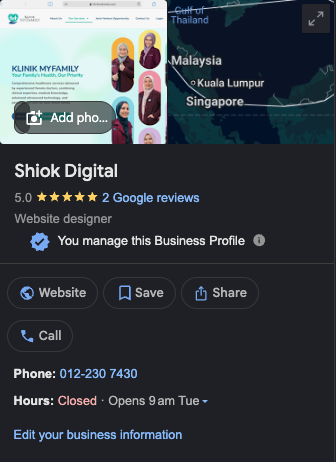
For “near me” and local searches, Google usually shows a map with a short list of businesses above the normal results. Each listing shows your rating, opening hours, phone number and a directions button. For many customers, that is the whole decision: they call or drive to whoever looks best on that list.
Your listing comes from your Google Business Profile. It is free, and you control what it says.
What to prepare first
- A Google account, ideally one for the business (not a staff member’s personal account).
- Your exact business name, as it appears on your signboard or SSM registration.
- Address (if customers visit you) or the areas you serve (if you go to them).
- Phone number customers can actually reach, plus your website if you have one.
- Opening hours, your logo and a few real photos of your premises, team or work.
Step-by-step setup
1. Start your profile
Go to google.com/business, sign in, and search for your business name. If it already appears (customers sometimes add businesses to Maps), claim it instead of creating a new one.
2. Enter your real business name
Use the name you trade under, nothing more. Adding keywords or locations that are not part of your name, like “Klinik ABC – Best Clinic Shah Alam”, breaks Google’s guidelines and can get the listing suspended.
3. Choose your primary category
This is one of the most important choices. Pick the category that best describes your main business, for example Medical clinic, Real estate agent, Bakery or Website designer. You can add secondary categories later for other services.
4. Add your location or service areas
If customers come to you (shop, clinic, office, restaurant), add your address and check the map pin sits exactly on your premises.
If you go to customers (aircond service, movers, home tuition, catering) or work from home, choose not to show your address and list the areas you serve instead, such as Petaling Jaya, Subang Jaya, Klang or Kuala Lumpur.
5. Add your phone number and website
Use a number that is answered during business hours. Add your website link; if you don’t have one yet, a simple landing page with a WhatsApp button is enough to start.
6. Verify your business
Google needs to confirm you are the real owner before the profile goes fully live. It will show you the verification options available for your business, which may include recording a short video of your premises, signage or tools, or a code by phone, SMS or email. Follow the instructions exactly; a video should clearly show your location and proof that you run the business. Review can take a few days.
Complete your profile
A verified but empty profile rarely ranks well. Fill in everything that applies:
- Opening hours, plus special hours for public holidays like Hari Raya, Chinese New Year and Deepavali so customers don’t turn up to a closed door.
- Business description (up to 750 characters): what you do, who you serve and where. Write it for customers, naturally.
- Photos: logo, cover photo, the outside of your premises (helps people find you), inside, your team and your products or work. Use real photos, not stock images.
- Products and services with short descriptions and prices where you can.
- Links to your website, booking page and social media.
How to rank higher on the map
Google says local results are based mainly on relevance (how well your profile matches the search), distance (how far you are from the searcher) and prominence (how well known and well reviewed you are). You can’t change distance, but you can improve the other two:
- Get more genuine reviews. Ask every happy customer. In your profile, use the option to share a review link and send it on WhatsApp right after a job well done.
- Reply to every review, including the bad ones. A calm, helpful reply to a complaint builds more trust than a perfect score.
- Post updates regularly: promotions, new products, festive greetings, recent projects. It shows Google and customers that you are active.
- Keep your details consistent: the same business name, phone number and area on your website, Facebook, Instagram and directory listings.
- Have a website that matches your profile, mentioning what you do and the areas you serve.
Your website and your profile work together: the profile gets you onto the map, and the website gives you a second chance to appear in the normal search results, with your own words in the description.

Mistakes that hurt (or get you suspended)
- Stuffing keywords into your business name. Use your real name only.
- Buying reviews or offering rewards for reviews. Google does not allow incentivised or fake reviews, and they can be removed or get the profile restricted.
- Using an address you don’t actually operate from, such as a virtual office you never staff.
- Creating duplicate profiles for the same location.
- Leaving wrong hours or an old phone number, especially over festive seasons.
Check what’s working
Your profile shows performance data: how many people found you, which searches they used, and how many called, asked for directions or clicked to your website. Check it monthly. If calls and website clicks are rising, keep doing what you’re doing.
Turn map views into WhatsApp enquiries
Many people check your website before they call. A clear landing page with your services, prices and a WhatsApp button turns that visit into an enquiry. Our landing pages start at RM850.
Frequently asked questions
Is Google Business Profile free?
Yes. Creating and managing a Google Business Profile is free. You only need a Google account.
Can I list a home-based business on Google Maps?
Yes. Choose not to show your address to the public and set the areas you serve instead, such as Shah Alam, Petaling Jaya or Klang. Your profile can still appear in searches from those areas.
How long does it take to appear on Google Maps?
Setting up the profile takes about 30 minutes. Verification can be quick or take several days depending on the method Google offers you. After that, ranking higher in local results takes time and depends on your reviews, information and activity.
Do I need a website if I have a Google Business Profile?
It is not required, but it helps. Many customers check your website before calling, and a website with the same business name, phone number and area as your profile gives Google more confidence in your listing.